Bandwidth & Transfer Time Calculator
This mirrors the water-pipe analogy from the chapter — a wider "pipe" (higher bandwidth) moves more data per second. Enter a file size and pick a connection type to see how long the transfer would take.
File Size → Transfer Time
● liveNetworks & Data Communication
A computer network is an interconnection among two or more computers or computing devices, allowing them to share data and resources. Data Communication is the process of transmitting digital data between devices through a medium such as cables or wireless signals.
Social networks
Friends and families connected through relationships.
Mobile networks
Phones connected for calls, messages, and internet.
Computer networks
Computers sharing files, videos, and information.
Service networks
Airlines, railways, banks, and hospitals connecting people, places, and services.
Basic Components of Data Communication
Key Terminologies
Node
Any device that can send, receive, or process data — computers, servers, printers, routers, switches, smartphones, IoT devices. Each node has a unique network address (e.g. an IP address).
Bandwidth
The amount of data that can be transmitted over a network in a given time. Like a water pipe: a wider pipe (higher bandwidth) lets more water (data) flow per second.
Latency
The time taken for data to travel from source to destination — in simple words, the delay in data transmission.
Bit Rate
The number of bits transmitted per second (bps). A higher bit rate means more data moves per second.
Transmission Modes
The direction in which data flows between two communicating devices. There are three main modes:
| Mode | Direction | Example |
|---|---|---|
| Simplex | One-way only, sender → receiver | Keyboard to computer, TV/radio broadcast |
| Half Duplex | Both directions, but not simultaneously | Walkie-talkies |
| Full Duplex | Both directions at the same time | Mobile phone calls |
Guided vs unguided media
Devices connect using guided media (cables/fiber, for wired communication) or unguided media (free space, for wireless communication using radio waves).
Packets
For communication, data in a network is divided into smaller packets, which are then carried over the network through a medium.
Classification Based on Transmission Media
Transmission media is the channel through which data travels between the sender and receiver, in the form of electrical signals, light, or electromagnetic waves. It is classified into Guided (Wired) and Unguided (Wireless) media.
A. Guided (Wired) Transmission Media
| Type | Description | Advantages | Limitations |
|---|---|---|---|
| Twisted Pair Cable | Insulated copper wire pairs twisted together; used in telephone lines and LANs | Inexpensive, easy to install, suited for short distances | Prone to interference & noise, limited bandwidth |
| Coaxial Cable | Central copper conductor with insulation, shield & outer cover; used in cable TV and broadband | Better noise protection, higher bandwidth than twisted pair | Thicker, harder to install, costlier |
| Optical Fiber Cable | Uses light signals through thin glass/plastic fibers | Extremely high speed, immune to electromagnetic interference, long-distance | Expensive, fragile, difficult to install |
B. Unguided (Wireless) Transmission Media
| Type | Description | Advantages | Limitations |
|---|---|---|---|
| Radio Waves | Long-distance wireless — FM radio, TV, Wi-Fi | Penetrates buildings, supports mobility | Prone to interference, limited security |
| Microwaves | High-frequency, point-to-point, between antennas | High data rate, suits satellite/cellular links | Needs line-of-sight, affected by weather |
| Infrared Waves | Short-range — remote controls, wireless keyboards | Secure, simple, no radio interference | Limited range, needs direct line-of-sight |
| Satellite Communication | Orbiting satellites transmit data across large distances | Wide geographical coverage, TV broadcast & GPS | Very costly, delay in signal transmission |
The choice of medium depends on distance, cost, data rate, and environment — e.g. Twisted Pair for small LANs, Optical Fiber for high-speed backbones, Wireless for mobile/remote use.
Classification Based on Geographical Coverage
Based on the area they cover, networks fall into four broad categories, from the smallest (PAN) to the largest (WAN).
A. PAN (Personal Area Network)
Connects devices within a very small area, typically around one person — a few metres. Wired PAN uses USB; wireless PAN (WPAN) uses Bluetooth, Wi-Fi, or Infrared. E.g. smartphone connected to a wireless earphone.
B. LAN (Local Area Network)
Connects computers, phones, tablets, and printers within a room, lab, building, or campus — up to 1 km. Uses Ethernet cables or Wi-Fi; speeds range from 10 Mbps (Ethernet) to 1000 Mbps (Gigabit Ethernet).
C. MAN (Metropolitan Area Network)
Covers 5 to 50 kilometres — usually a city or large campus — connecting multiple LANs. Data rates typically 10 Mbps to 1 Gbps+. E.g. cable TV network, public Wi-Fi hotspots.
D. WAN (Wide Area Network)
Spans several countries or the globe — thousands of kilometres. Uses telephone lines, fiber, satellite links; usually owned by ISPs/telecom companies. The Internet is the best example.
Wired LAN
Computers and peripherals connected within a limited area using Ethernet or fiber cables. Advantages: high speed, reliable, secure, low latency. E.g. a computer lab connected with Ethernet cables.
Wireless LAN (WLAN)
Uses high-frequency radio waves instead of cables; devices connect via a Wireless Access Point (WAP), most commonly Wi-Fi. Advantages: mobility, scalability, easy installation, cost-efficient.
WAN vs the Internet
| WAN (Wide Area Network) | Internet |
|---|---|
| Connects computers/devices over a large geographical area | A global network of networks connecting millions of private and public networks |
| Limited to an organization or specific purpose | Worldwide, open to everyone |
| Owned and managed by a single organization | No single owner; managed collectively by ISPs and organizations |
| Restricted to authorized users only | Publicly accessible to all users |
| More secure as it is private | Less secure compared to private WANs |
| Expensive to set up and maintain | Relatively low cost for end users |
Network Devices
Network devices are hardware components that connect computers and other electronic devices together to form a network — each performing a specific role in moving data efficiently.
Modem (Modulator–Demodulator)
Allows digital computers to communicate over analog lines (like telephone lines). Modulation converts digital → analog for sending; demodulation converts analog → digital on receiving.
NIC (Network Interface Card)
A hardware adaptor — often built into the motherboard — that provides the physical interface connecting a device to the network. Each NIC has a unique MAC address.
Repeater
Extends network coverage by amplifying and retransmitting weak signals (attenuation), without changing or filtering the original data.
Hub
A basic device that broadcasts incoming data to all connected devices — it does not check MAC addresses or filter traffic.
Switch
An "intelligent" device that learns each device's MAC address and forwards data only to the intended port — reducing traffic and collisions.
Router
Connects multiple networks together (e.g. LAN to the Internet) by reading destination IP addresses and routing packets to the correct network.
Gateway
Connects two networks that use different protocols, acting as a translator — converts data formats so both networks can communicate.
Firewall
A security device/software barrier between a trusted internal network and an untrusted external network — controls incoming/outgoing traffic based on security rules.
Types of Modem
| Type | Medium | Speed Range | Common Usage |
|---|---|---|---|
| Dial-up | Telephone line (analog) | Up to 56 Kbps | Old Internet connections, basic email |
| DSL | Telephone line (digital) | 1–50 Mbps | Home broadband, small offices |
| Cable | Coaxial cable (TV line) | 10–200 Mbps | Home & office broadband |
| Wireless | Cellular (3G/4G/5G) | 10–100 Mbps | Laptops, mobile hotspots |
| Fiber Optic (ONT) | Fiber optic cable | Up to 1 Gbps | Modern fiber broadband, institutions |
| Satellite | Satellite communication | 1–50 Mbps | Rural or remote Internet access |
Network Topology
Network topology is the arrangement or layout in which devices (nodes) are connected to each other — it defines how data flows and how each device communicates with the others.
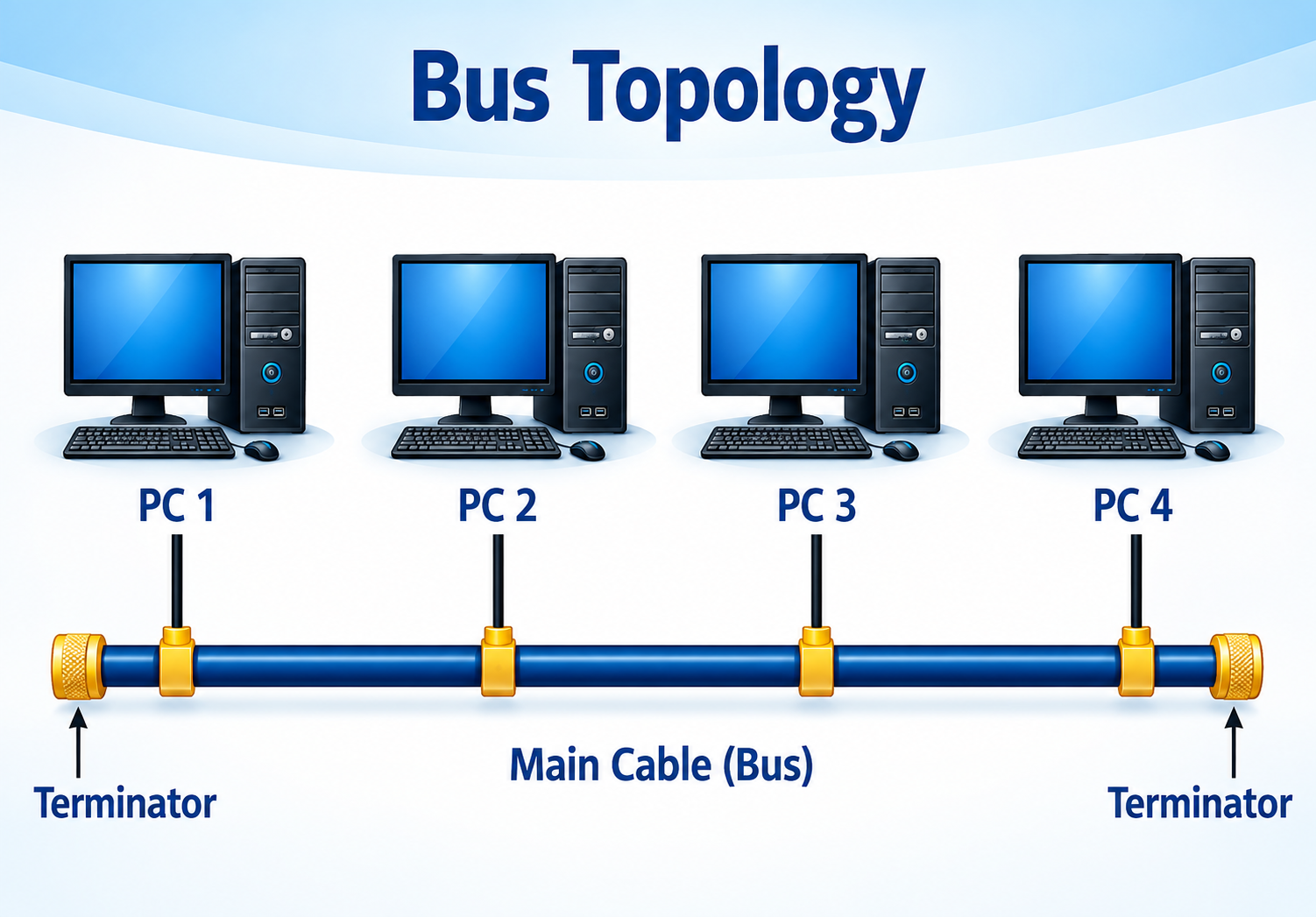 All nodes connect to a single central cable (the bus/main cable).
Data travels in both directions along the bus; every device checks
the destination address and only the intended receiver accepts it.
Terminators sit at both ends of the cable to prevent signal reflection.
+ Low cost, easy to install, needs less cable
- Main cable failure stops the entire network; high data collisions
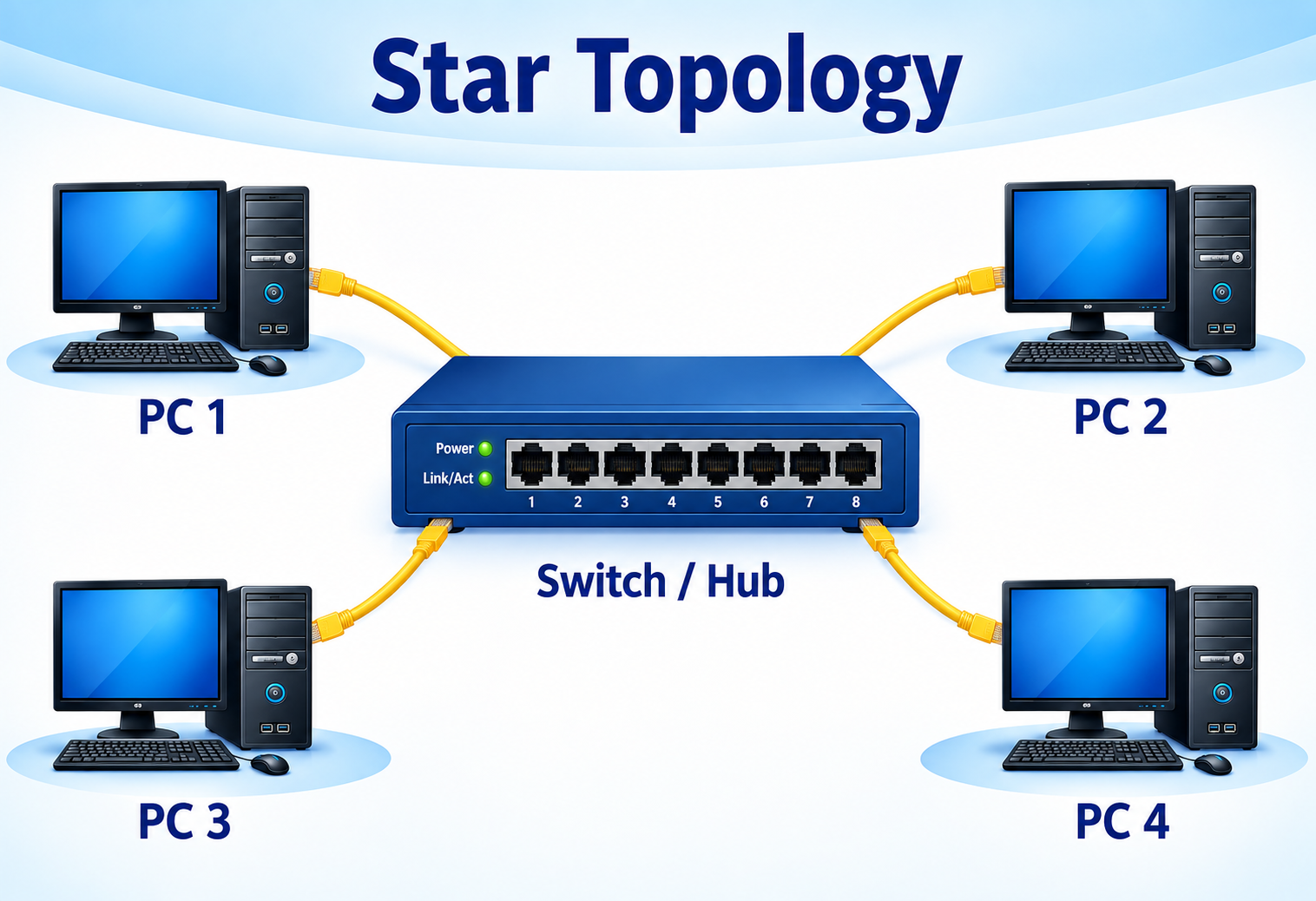 All computers connect to a central device (hub or switch), each with
its own dedicated link. A switch forwards data only to the intended
node; a hub broadcasts to everyone.
+ Easy to manage, one node's failure doesn't affect others, high security
- Central hub/switch failure affects the whole network; more cable needed
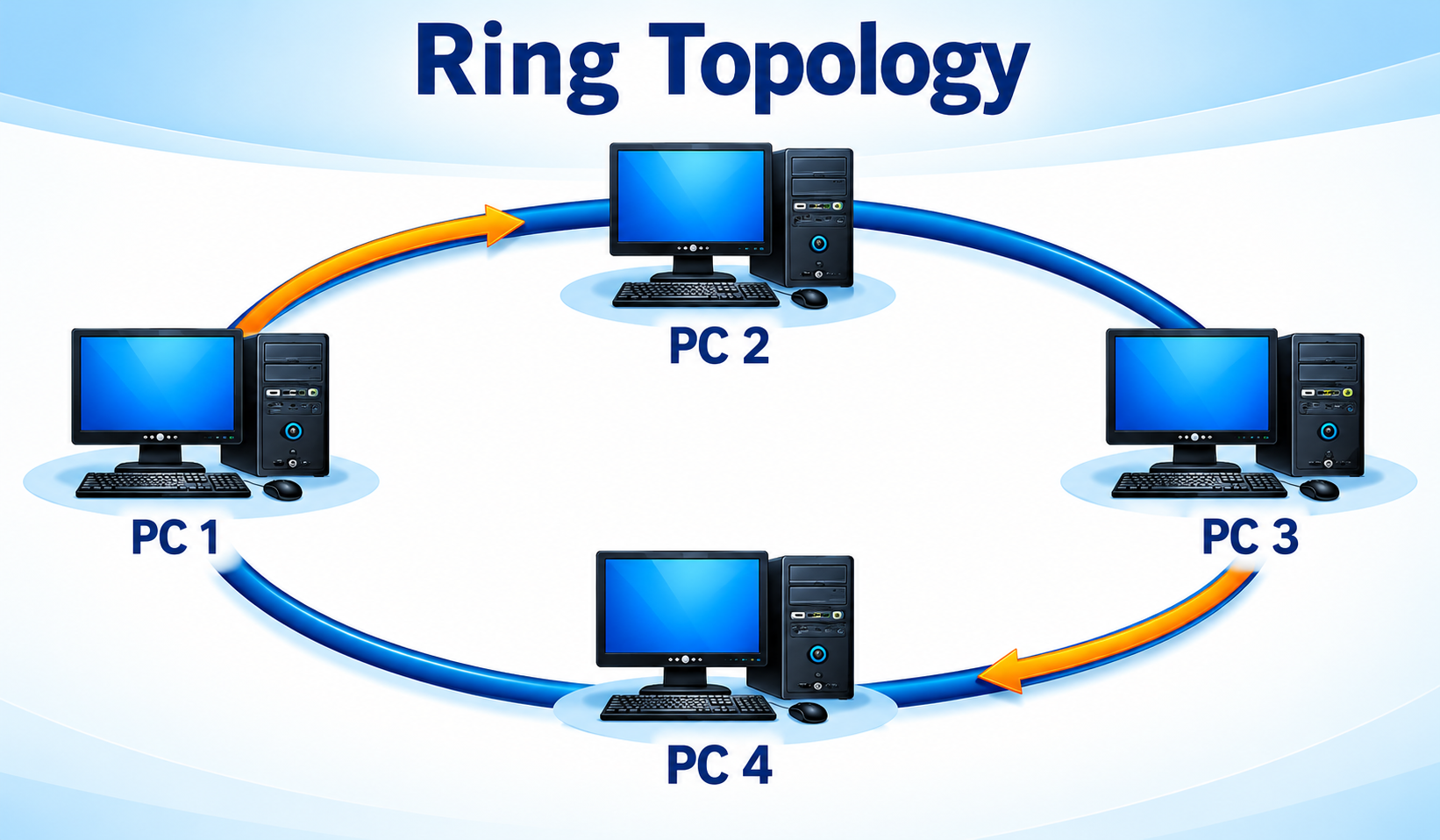 Nodes are connected in a closed loop, each linked to exactly two
neighbours. A token circulates the ring — a device can only send
data when it holds the token — reducing collisions.
+ Orderly data transfer, equal access to all nodes
- One node/cable failure can affect the entire ring; hard to troubleshoot
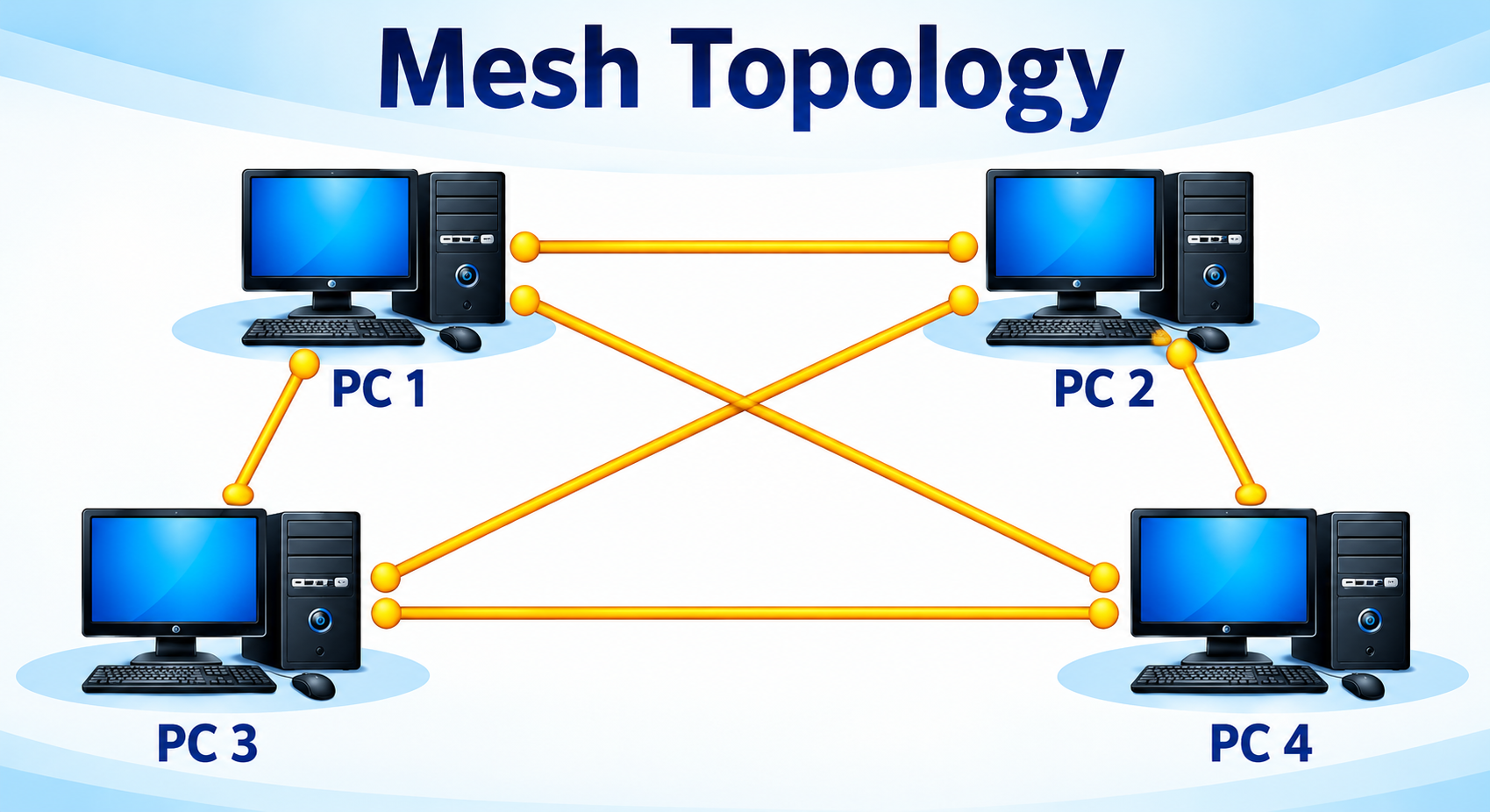 Every device connects to every other device via dedicated
point-to-point links, giving multiple possible paths for data.
+ Highly reliable and fault-tolerant, high security, no congestion
- Very expensive (large numbers of cables/ports), complex to install
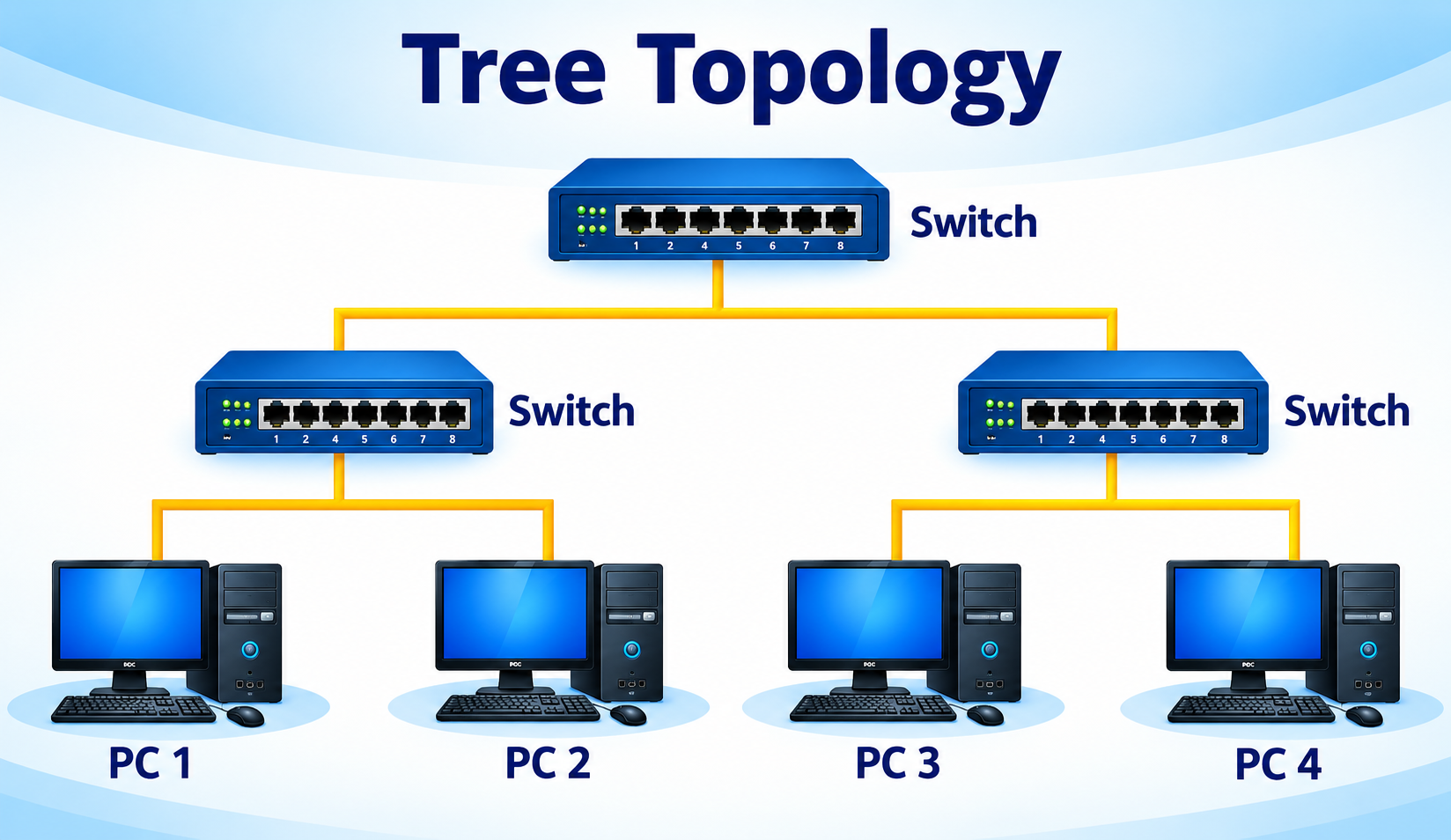 A hierarchical structure combining star and bus topologies — groups
of computers form stars connected to hubs/switches, which are
then linked to a main backbone cable.
+ Easy to expand, well-structured, suits large organizations
- Backbone failure affects the whole network; more expensive
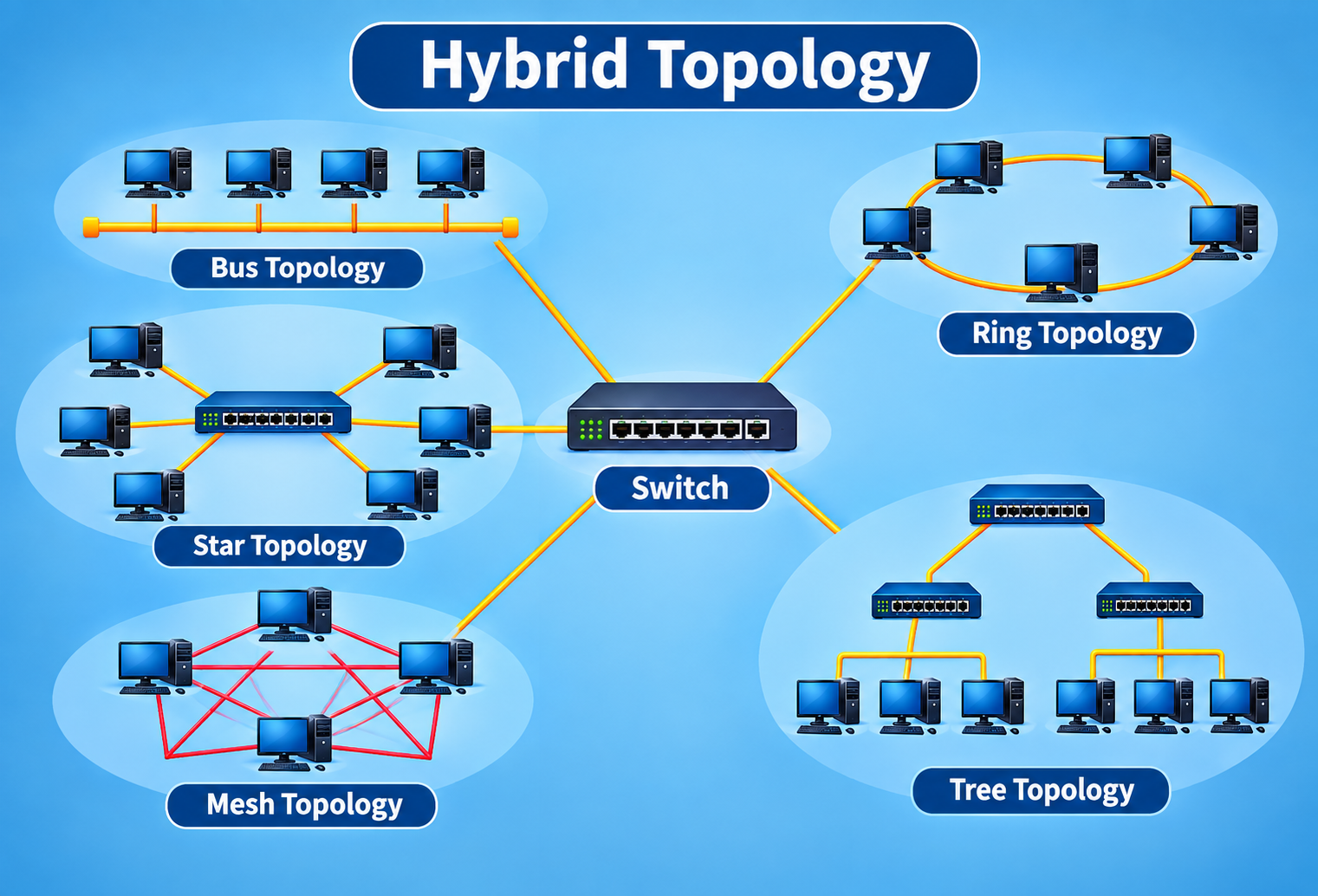 Formed by combining two or more topologies (e.g. star + bus) so
different segments can use whichever topology suits them best.
+ Flexible, reliable, scalable for large enterprises
- Very expensive, complex design, needs skilled administrators
The Internet & Protocols for Data Communication
The Internet is a global network connecting millions of devices via interconnected networks and standard protocols like TCP/IP. A protocol is a set of rules that defines how data is formatted, transmitted, and received.
How a web request travels
Client → ISP → routers/switches/gateways → web server → data packets travel back and are reassembled by the browser. TCP ensures reliable delivery; IP handles addressing and routing.
DNS (Domain Name System)
Translates human-readable domain names (www.google.com) into IP addresses (142.250.190.68) — the "phone book" of the Internet, working via local cache → resolver → root → TLD → authoritative server.
Common Protocols
| Protocol | Full Form | Purpose / Used For |
|---|---|---|
| HTTP | Hyper Text Transfer Protocol | Foundation of web data exchange; fetches HTML documents and resources |
| HTTPS | Hyper Text Transfer Protocol Secure | Secure HTTP using SSL/TLS encryption for passwords, banking, etc. |
| FTP | File Transfer Protocol | Transfers files between a client and a server over a network |
| TCP/IP | Transmission Control Protocol / Internet Protocol | Governs how data is packeted, addressed, transmitted & routed |
| SMTP | Simple Mail Transfer Protocol | Sends and routes outgoing email from client to server |
| POP3 | Post Office Protocol version 3 | Downloads email to a device, usually deleting it from the server |
| IMAP | Internet Message Access Protocol | Synchronizes email across multiple devices, keeping it on the server |
| MIME | Multipurpose Internet Mail Extensions | Lets email carry non-text content — images, audio, video, attachments |
| DNS | Domain Name System | Translates human-friendly URLs into IP addresses |
Network-Based Services
Network-based services are applications and processes that use a network — usually the Internet — to deliver specific functions to users, spanning education, business, entertainment, and government.
| Service | Purpose / Use | Example |
|---|---|---|
| E-mail Service | Communication & information sharing | Gmail, Outlook, Zoho Mail |
| File Transfer Service | Sharing documents and data | FTP, Google Drive |
| Web Service (WWW) | Information access | Google, Wikipedia |
| Chat Service | Instant messaging | WhatsApp, Telegram |
| Video Conferencing | Online meetings and classes | Zoom, Google Meet |
| Remote Login Service | Remote system management | Telnet, SSH |
| Cloud Storage Service | Data backup and storage | Dropbox, OneDrive |
| Streaming Service | Entertainment and learning | YouTube, Netflix |
| Online Transaction Service | Banking and shopping | Online banking, Amazon |
| Social Networking Service | Social interaction | Facebook, Instagram |
PAN, LAN, MAN & WAN — Comparison
All four classify networks by geographical coverage, but each fits a different scale of use.
| Feature | PAN | LAN | MAN | WAN |
|---|---|---|---|---|
| Coverage | A few metres (one person) | Room / building (up to ~1 km) | 5–50 km (a city) | Countries / globe |
| Typical medium | Bluetooth, USB, Infrared | Ethernet, Wi-Fi | Fiber optic, wireless | Telephone lines, fiber, satellite |
| Speed | Short-range, moderate | 10 Mbps – 1000 Mbps | 10 Mbps – 1 Gbps+ | Slower over distance, up to a few Gbps |
| Ownership | Individual | Single organization/home | Business/government/institution | ISP or telecom company |
| Example | Phone ↔ wireless earphone | Computer lab | City cable TV network | The Internet, banking networks |
Quick Recap
Tap a question to reveal the answer.
What is a node in a computer network?
Any device that can send, receive, or process data — e.g. computers, servers, printers, routers, and smartphones — each identified by a unique network address.
What is bandwidth, in simple terms?
The amount of data that can be transmitted over a network in a given time — like the width of a pipe, wider means more data flows per second.
Which transmission mode does a keyboard use to send data to a computer?
Simplex — data flows only one way, from sender to receiver.
Which device connects multiple networks together using IP addresses?
A router — it reads the destination IP address in each packet and forwards it to the correct network.
What is the key difference between a hub and a switch?
A hub broadcasts data to every connected device; a switch is "intelligent" — it learns MAC addresses and forwards data only to the intended device.
Which topology provides a dedicated point-to-point link between every pair of nodes?
Mesh topology — highly reliable since a failed link doesn't stop other connections, but expensive to install.
What does DNS do?
It translates human-readable domain names (like www.google.com) into numeric IP addresses that computers use to identify each other.
Which protocol keeps online communication secure using SSL encryption?
HTTPS — the secure version of HTTP, used for banking, shopping, and other sensitive data.
What is the difference between POP3 and IMAP?
POP3 downloads email to a device and typically deletes it from the server; IMAP keeps email on the server and synchronizes it across multiple devices.
Why is MAN sometimes called a "network of LANs"?
Because a Metropolitan Area Network connects multiple LANs across a city or large campus into one larger network.